This tutorial helps you understand population data using the Global Human Settlement (GHS) datasets. You’ll explore and compare two different datasets to understand their characteristics and differences.
We’ll work with:
GHS-POP: Historical and projected population (1975-2030)
GHS-WUP: Urban population projections (1975-2100)
For more detail on what these datasets are, why they differ, and where they come from, see the GHS Population reference page.
Prerequisites: We’ll use preprocessed data for the region “Central Greece” (NUTS2 region “EL64”)). If you change the region, please download and process the data population data for your region using the Population GHS how-to guide.
What you’ll learn:
Load and visualize population timeseries from CSV files
Explore spatial population distributions from raster data
Compare different population datasets
Understand temporal and spatial patterns in population dynamics
Setup
User settings
admin_id = "EL64" # Central GreeceLoad libraries
import xarray as xr
import numpy as np
import pandas as pd
import matplotlib.pyplot as plt
import geopandas as gpd
import regionmask
from pathlib import Path
import rioxarray as rxr
import os
import re

# Set up data directories
data_dir = Path("../data")
ghs_pop_dir = data_dir / "population" / "GHS_POP"
ghs_wup_dir = data_dir / "population" / "GHS_WUP_POP"
output_dir = data_dir / admin_id / "ghs_population"

print(f"Data directories:")
print(f"  GHS-POP: {ghs_pop_dir}")
print(f"  GHS-WUP: {ghs_wup_dir}")
print(f"  Output: {output_dir}")
Data directories:
GHS-POP: ../data/population/GHS_POP
GHS-WUP: ../data/population/GHS_WUP_POP
Output: ../data/EL64/ghs_population
Load region shapefile
# Read NUTS shapefiles
regions_dir = data_dir / 'regions'
nuts_shp = regions_dir / 'NUTS_RG_20M_2024_4326' / 'NUTS_RG_20M_2024_4326.shp'
nuts_gdf = gpd.read_file(nuts_shp)

# Select the region of interest
sel_gdf = nuts_gdf[nuts_gdf['NUTS_ID'] == admin_id]
print(f"Region: {sel_gdf['NUTS_NAME'].values[0]} ({admin_id})")
print(f"Country: {sel_gdf['CNTR_CODE'].values[0]}")
lon_min, lat_min, lon_max, lat_max = sel_gdf.geometry.total_bounds

# Create a regionmask from the admin region geometry
admin_mask = regionmask.from_geopandas(sel_gdf, names='NUTS_ID')
Region: Στερεά Ελλάδα (EL64)
Country: EL
Load Population Timeseries
First, let’s load the processed CSV files created by the population_ghs how-to guide.
# Load CSV files
csv_ghs_pop = output_dir / f"population_ghs_pop_{admin_id}.csv"
csv_ghs_wup = output_dir / f"population_ghs_wup_{admin_id}.csv"

# Read the data
df_ghs_pop = pd.read_csv(csv_ghs_pop)
df_ghs_wup = pd.read_csv(csv_ghs_wup)

print("GHS-POP data:")
print(f"  Years: {df_ghs_pop['year'].min():.0f} - {df_ghs_pop['year'].max():.0f}")
print(f"  Records: {len(df_ghs_pop)}")
print(f"\nGHS-WUP data:")
print(f"  Years: {df_ghs_wup['year'].min():.0f} - {df_ghs_wup['year'].max():.0f}")
print(f"  Records: {len(df_ghs_wup)}")

# Display first few rows
print(f"\nGHS-POP sample:")
print(df_ghs_pop.head())
print(f"\nGHS-WUP sample:")
print(df_ghs_wup.head())
GHS-POP data:
Years: 1975 - 2030
Records: 12
GHS-WUP data:
Years: 1975 - 2100
Records: 26
GHS-POP sample:
year population
0 1975 416420.375064
1 1980 428631.335356
2 1985 462089.214682
3 1990 493136.923161
4 1995 518886.744711
GHS-WUP sample:
year population
0 1975 425902.285106
1 1980 444017.973223
2 1985 470750.898576
3 1990 490412.746349
4 1995 508224.276600
Compare Population Timeseries
Let’s visualize and compare the two datasets to understand their differences.
Visualize both datasets
The plot below overlays GHS-POP and GHS-WUP population timeseries for the same region. This lets you see both datasets over their shared period (1975–2030) and the GHS-WUP projection continuing to 2100.
fig, ax = plt.subplots(figsize=(14, 6))

ax.plot(df_ghs_pop['year'], df_ghs_pop['population'],
        marker='o', linewidth=2, markersize=8, label='GHS-POP (1975-2030)', color='#2E86AB')
ax.plot(df_ghs_wup['year'], df_ghs_wup['population'],
        marker='s', linewidth=2, markersize=6, label='GHS-WUP (1975-2100)', color='#A23B72', alpha=0.8)

ax.set_xlabel('Year', fontsize=12)
ax.set_ylabel('Population', fontsize=12)
ax.set_title(f'Population Change in {admin_id} - Dataset Comparison', fontsize=14, fontweight='bold')
ax.legend(fontsize=11, loc='upper left')
ax.grid(True, alpha=0.3)

# Format y-axis
from matplotlib.ticker import FuncFormatter
def millions(x, pos):
    return f'{x/1e6:.1f}M' if x >= 1e6 else f'{x/1e3:.0f}K'
ax.yaxis.set_major_formatter(FuncFormatter(millions))

plt.tight_layout()
plt.show()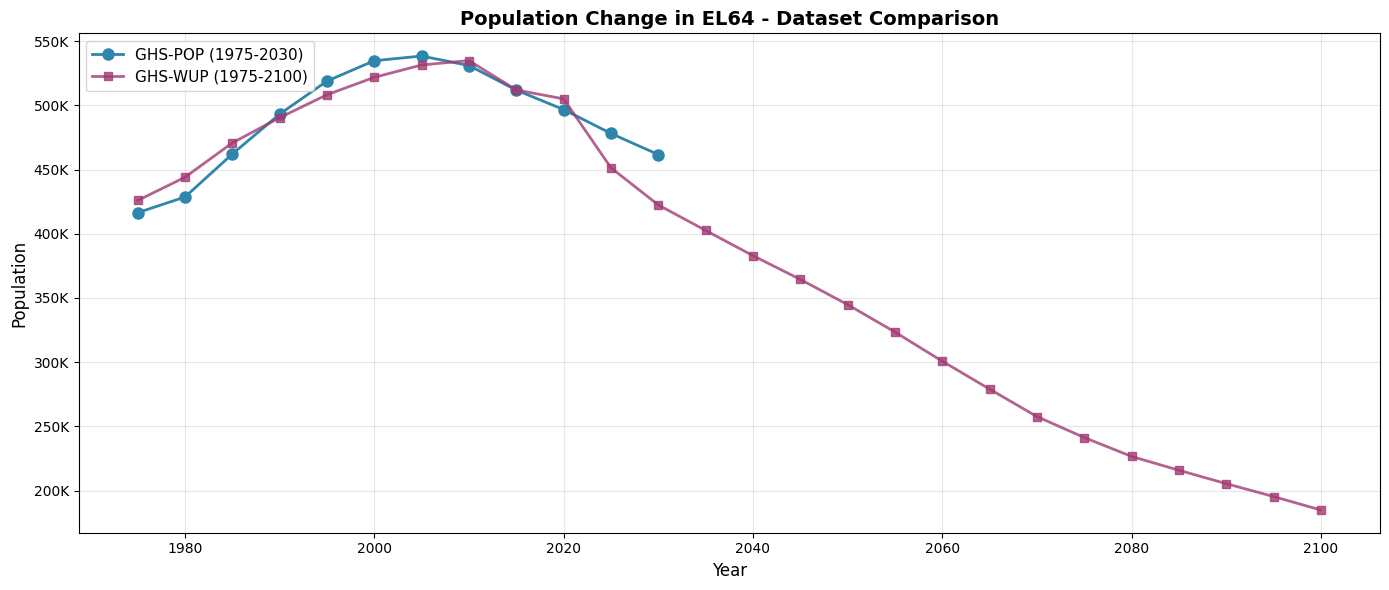
Figure: Population timeseries for Central Greece (EL64). The blue line shows GHS-POP (1975–2030) and the purple line shows GHS-WUP (1975–2100). The two datasets broadly agree in the historical period; GHS-WUP extends projections to 2100 using the CRISP urban-growth model.
Quantify differences
For overlapping years (1975-2030), let’s calculate the differences between the two datasets.
# Merge datasets on year for overlapping period
df_comparison = df_ghs_pop.merge(df_ghs_wup, on='year', suffixes=('_pop', '_wup'))

# Calculate differences
df_comparison['difference'] = df_comparison['population_wup'] - df_comparison['population_pop']
df_comparison['percent_diff'] = (df_comparison['difference'] / df_comparison['population_pop']) * 100

print("Dataset Comparison (1975-2030):")
print("="*80)
print(f"{'Year':<8} {'GHS-POP':>15} {'GHS-WUP':>15} {'Difference':>15} {'Diff %':>10}")
print("-"*80)

for _, row in df_comparison.iterrows():
    print(f"{row['year']:<8.0f} {row['population_pop']:>15,.0f} {row['population_wup']:>15,.0f} "
          f"{row['difference']:>15,.0f} {row['percent_diff']:>9.2f}%")

print("\nSummary Statistics:")
print(f"  Mean absolute difference: {df_comparison['difference'].abs().mean():,.0f} people")
print(f"  Mean percentage difference: {df_comparison['percent_diff'].abs().mean():.2f}%")
print(f"  Max difference: {df_comparison['difference'].abs().max():,.0f} in {df_comparison.loc[df_comparison['difference'].abs().idxmax(), 'year']:.0f}")
Dataset Comparison (1975-2030):
================================================================================
Year GHS-POP GHS-WUP Difference Diff %
--------------------------------------------------------------------------------
1975 416,420 425,902 9,482 2.28%
1980 428,631 444,018 15,387 3.59%
1985 462,089 470,751 8,662 1.87%
1990 493,137 490,413 -2,724 -0.55%
1995 518,887 508,224 -10,662 -2.05%
2000 534,728 521,798 -12,930 -2.42%
2005 538,363 531,397 -6,966 -1.29%
2010 530,982 534,820 3,837 0.72%
2015 511,821 511,960 139 0.03%
2020 496,688 505,003 8,314 1.67%
2025 478,108 451,386 -26,722 -5.59%
2030 461,641 422,460 -39,181 -8.49%
Summary Statistics:
Mean absolute difference: 12,084 people
Mean percentage difference: 2.55%
Max difference: 39,181 in 2030
The table above shows that the two datasets can differ by several percent for the same year, even over the historical period. These differences stem from the distinct population disaggregation and projection methods used by each dataset — neither is simply “more correct”; the choice depends on your use case.
Explore Spatial Population Distribution
Now let’s load and visualize the actual spatial raster data to understand population distribution patterns.
Load GHS-POP raster data
We load GHS-POP raster files for a selection of years and clip them to the bounding box of the selected region. Each file is a global GeoTIFF; clipping to the bounding box keeps only the relevant area before applying the exact region mask.
Interactive map of present-day population
First, let’s create an interactive map of the current population distribution that you can zoom and explore.
# Load 2020 data for interactive map
!pip install folium
import folium
from folium import plugins

# Load GHS-POP files
ghs_pop_files = sorted(list(ghs_pop_dir.glob("*/GHS_POP_E*_GLOBE_R2023A_4326_30ss_V1_0.tif")))

# Load GHS-POP 2020
present_year = 2020
ghs_pop_2020_file = [f for f in ghs_pop_files if f"E{present_year}" in f.name]

if ghs_pop_2020_file:
    tif_file = ghs_pop_2020_file[0]
    ds_2020 = rxr.open_rasterio(tif_file)
    # Clip to region
    ds_2020_clipped = ds_2020.sel(x=slice(lon_min, lon_max), y=slice(lat_max, lat_min))
    ds_2020_clipped = ds_2020_clipped.where(ds_2020_clipped >= 0)
    pop_2020 = ds_2020_clipped.squeeze("band", drop=True)

    # Apply mask
    mask_2020 = admin_mask.mask(pop_2020.x, pop_2020.y)
    pop_2020_masked = pop_2020.where(~np.isnan(mask_2020.values))

    print(f"Loaded GHS-POP {present_year} for interactive map")
    print(f"Data shape: {pop_2020_masked.shape}")
    print(f"Value range: {float(pop_2020_masked.min()):.2f} - {float(pop_2020_masked.max()):.2f}")
else:
    print(f"Could not find GHS-POP {present_year} file")
Defaulting to user installation because normal site-packages is not writeable
Requirement already satisfied: folium in /home/nejk/.local/lib/python3.13/site-packages (0.20.0)
Requirement already satisfied: branca>=0.6.0 in /usr/local/apps/python3/3.13.13-01/lib/python3.13/site-packages (from folium) (0.8.2)
Requirement already satisfied: jinja2>=2.9 in /usr/local/apps/python3/3.13.13-01/lib/python3.13/site-packages (from folium) (3.1.6)
Requirement already satisfied: numpy in /usr/local/apps/python3/3.13.13-01/lib/python3.13/site-packages (from folium) (2.3.5)
Requirement already satisfied: requests in /usr/local/apps/python3/3.13.13-01/lib/python3.13/site-packages (from folium) (2.32.5)
Requirement already satisfied: xyzservices in /usr/local/apps/python3/3.13.13-01/lib/python3.13/site-packages (from folium) (2026.3.0)
Requirement already satisfied: MarkupSafe>=2.0 in /usr/local/apps/python3/3.13.13-01/lib/python3.13/site-packages (from jinja2>=2.9->folium) (3.0.3)
Requirement already satisfied: charset_normalizer<4,>=2 in /usr/local/apps/python3/3.13.13-01/lib/python3.13/site-packages (from requests->folium) (3.4.7)
Requirement already satisfied: idna<4,>=2.5 in /usr/local/apps/python3/3.13.13-01/lib/python3.13/site-packages (from requests->folium) (3.11)
Requirement already satisfied: urllib3<3,>=1.21.1 in /usr/local/apps/python3/3.13.13-01/lib/python3.13/site-packages (from requests->folium) (2.6.3)
Requirement already satisfied: certifi>=2017.4.17 in /usr/local/apps/python3/3.13.13-01/lib/python3.13/site-packages (from requests->folium) (2026.2.25)
Loaded GHS-POP 2020 for interactive map
Data shape: (154, 393)
Value range: 0.00 - 7606.67
# Create interactive folium map
# Calculate center of region
center_lat = (lat_min + lat_max) / 2
center_lon = (lon_min + lon_max) / 2

# Create base map with a nice satellite/terrain basemap
m = folium.Map(
    location=[center_lat, center_lon],
    zoom_start=9,
    tiles=None  # We'll add custom tiles
)

# Add multiple basemap options
folium.TileLayer('OpenStreetMap', name='OpenStreetMap').add_to(m)
folium.TileLayer(
    tiles='https://server.arcgisonline.com/ArcGIS/rest/services/World_Imagery/MapServer/tile/{z}/{y}/{x}',
    attr='Esri World Imagery',
    name='Satellite',
    overlay=False,
    control=True
).add_to(m)
folium.TileLayer(
    tiles='https://server.arcgisonline.com/ArcGIS/rest/services/World_Topo_Map/MapServer/tile/{z}/{y}/{x}',
    attr='Esri World Topo',
    name='Topographic',
    overlay=False,
    control=True
).add_to(m)

# Add region boundary
folium.GeoJson(
    sel_gdf.geometry,
    name=f'Region {admin_id}',
    style_function=lambda x: {
        'fillColor': 'none',
        'color': 'red',
        'weight': 3,
        'fillOpacity': 0
    }
).add_to(m)

# Add population data as a heatmap overlay
# Convert to numpy array and get coordinates
pop_array = pop_2020_masked.values
y_coords = pop_2020_masked.y.values
x_coords = pop_2020_masked.x.values

# Create heat map data points (sample for performance)
heat_data = []
step = max(1, len(y_coords) // 100)  # Sample every nth point for performance

for i in range(0, len(y_coords), step):
    for j in range(0, len(x_coords), step):
        val = pop_array[i, j]
        if not np.isnan(val) and val > 0:
            heat_data.append([y_coords[i], x_coords[j], float(val)])

# Add heatmap
plugins.HeatMap(
    heat_data,
    name='Population Heatmap',
    min_opacity=0.3,
    max_zoom=13,
    radius=15,
    blur=20,
    gradient={0.4: 'yellow', 0.6: 'orange', 0.8: 'red', 1.0: 'darkred'}
).add_to(m)

# Add layer control
folium.LayerControl().add_to(m)

# Add title
title_html = f'''
<div style="position: fixed;
     top: 10px; left: 50px; width: 400px; height: 60px;
     background-color: white; border:2px solid grey; z-index:9999;
     font-size:16px; padding: 10px; box-shadow: 2px 2px 6px rgba(0,0,0,0.3);">
     <b>Population Distribution {admin_id} ({present_year})</b><br>
     <i>Toggle layers and zoom to explore</i>
</div>
'''
m.get_root().html.add_child(folium.Element(title_html))

# Display map
mFigure: Interactive population heatmap for Central Greece (EL64) in 2020 (GHS-POP). Brighter colours indicate higher population density. Use the layer control (top right) to switch between OpenStreetMap, satellite and topographic basemaps, and zoom in to explore local patterns.
# Load GHS-POP files for selected years
ghs_pop_files = sorted(list(ghs_pop_dir.glob("*/GHS_POP_E*_GLOBE_R2023A_4326_30ss_V1_0.tif")))
print(f"Found {len(ghs_pop_files)} GHS-POP files")

# Load three key years: past, midpoint, and projected end
selected_years_pop = [1990, 2010, 2030]
pop_data_dict = {}

for year in selected_years_pop:
    matching_files = [f for f in ghs_pop_files if f"E{year}" in f.name]
    if matching_files:
        tif_file = matching_files[0]
        ds = rxr.open_rasterio(tif_file)
        # Clip to region
        ds_clipped = ds.sel(x=slice(lon_min, lon_max), y=slice(lat_max, lat_min))
        ds_clipped = ds_clipped.where(ds_clipped >= 0)  # Remove fill values
        pop_data_dict[year] = ds_clipped.squeeze("band", drop=True)
        print(f"  Loaded {year}: shape {ds_clipped.shape}")

print(f"\nLoaded {len(pop_data_dict)} years of GHS-POP data")
Found 12 GHS-POP files
Loaded 1990: shape (1, 154, 393)
Loaded 2010: shape (1, 154, 393)
Loaded 2030: shape (1, 154, 393)
Loaded 3 years of GHS-POP data
Load GHS-WUP raster data
We repeat the same loading procedure for GHS-WUP, using the same set of years so that the two datasets can be directly compared spatially in the sections below.
# Load GHS-WUP files for the same years
ghs_wup_files = sorted(list(ghs_wup_dir.glob("*/GHS_WUP_POP_E*_GLOBE_R2025A_4326_30ss_V1_0.tif")))
print(f"Found {len(ghs_wup_files)} GHS-WUP files")

wup_data_dict = {}

for year in selected_years_pop:
    matching_files = [f for f in ghs_wup_files if f"E{year}" in f.name]
    if matching_files:
        tif_file = matching_files[0]
        ds = rxr.open_rasterio(tif_file)
        # Clip to region
        ds_clipped = ds.sel(x=slice(lon_min, lon_max), y=slice(lat_max, lat_min))
        ds_clipped = ds_clipped.where(ds_clipped >= 0)  # Remove fill values
        wup_data_dict[year] = ds_clipped.squeeze("band", drop=True)
        print(f"  Loaded {year}: shape {ds_clipped.shape}")

print(f"\nLoaded {len(wup_data_dict)} years of GHS-WUP data")
Found 26 GHS-WUP files
Loaded 1990: shape (1, 154, 393)
Loaded 2010: shape (1, 154, 393)
Loaded 2030: shape (1, 154, 393)
Loaded 3 years of GHS-WUP data
Population growth rate (1990–2030)
Rather than plotting each year separately, we compute the cumulative population change from 1990 to 2030 using GHS-POP. This makes spatial patterns of growth and decline immediately visible in a single map.
# Compute GHS-POP growth rate: percent change 1990 → 2030
start_year, end_year = 1990, 2030

# Apply region mask to both years
mask_start = admin_mask.mask(pop_data_dict[start_year].x, pop_data_dict[start_year].y)
pop_start = pop_data_dict[start_year].where(~np.isnan(mask_start.values))

mask_end = admin_mask.mask(pop_data_dict[end_year].x, pop_data_dict[end_year].y)
pop_end = pop_data_dict[end_year].where(~np.isnan(mask_end.values))

# Percent change; mask cells with very low base population to avoid division artefacts
min_pop = 1.0
pct_change = ((pop_end - pop_start) / pop_start.where(pop_start >= min_pop)) * 100

# Plot
fig, ax = plt.subplots(figsize=(10, 8))

pct_change.plot(
    ax=ax,
    cmap='RdBu_r',
    add_colorbar=True,
    cbar_kwargs={'label': f'Population change {start_year}–{end_year} (%)', 'shrink': 0.7},
    vmin=-100,
    vmax=100,
)

sel_gdf.boundary.plot(ax=ax, color='black', linewidth=2)
ax.set_title(f'Population Change in {admin_id} ({start_year}–{end_year})\nGHS-POP', fontsize=14, fontweight='bold')
ax.set_xlabel('Longitude')
ax.set_ylabel('Latitude')

plt.tight_layout()
plt.show()

# Regional summary
print(f"Regional population change ({start_year}–{end_year}):")
print(f"  {start_year}: {pop_start.sum().values:,.0f}")
print(f"  {end_year}: {pop_end.sum().values:,.0f}")
overall_pct = (pop_end.sum().values - pop_start.sum().values) / pop_start.sum().values * 100
print(f"  Overall change: {overall_pct:+.1f}%")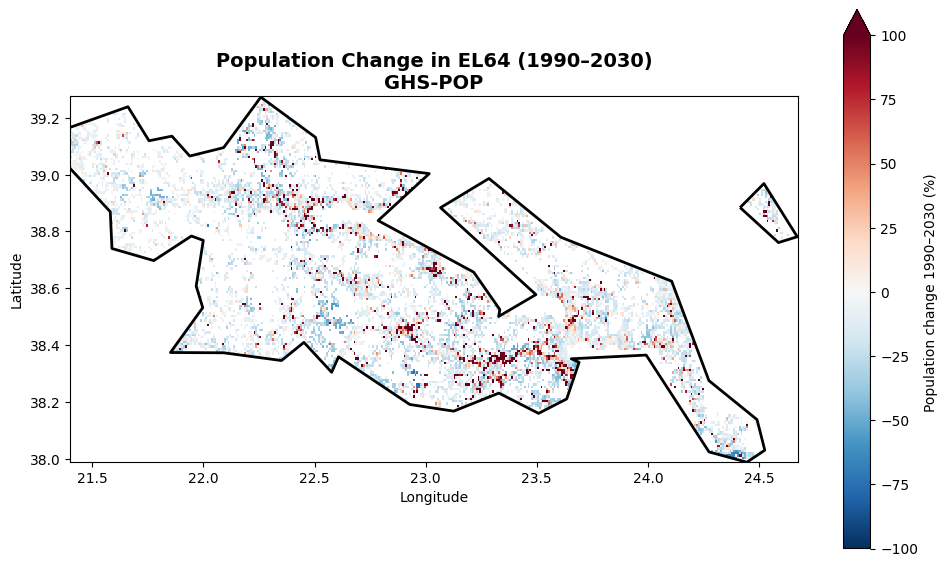
Regional population change (1990–2030):
  1990: 493,137
  2030: 461,641
  Overall change: -6.4%
Figure: Cumulative population change (%) in Central Greece (EL64) from 1990 to 2030 (GHS-POP). Blue indicates growth; red indicates decline. Cells with fewer than 1 person in 1990 are masked out. The regional total percentage change is printed below.
Compare spatial patterns: Side-by-side
Let’s compare GHS-POP and GHS-WUP for the same year to understand the differences.
# Compare 2030 for both datasets (last year available in both GHS-POP and GHS-WUP)
comparison_year = 2030

fig, axes = plt.subplots(1, 3, figsize=(22, 4))

# GHS-POP
mask_pop_raw = admin_mask.mask(pop_data_dict[comparison_year].x, pop_data_dict[comparison_year].y)
masked_pop = pop_data_dict[comparison_year].where(~np.isnan(mask_pop_raw.values))

im1 = masked_pop.plot(
    ax=axes[0],
    cmap='YlOrRd',
    add_colorbar=True,
    cbar_kwargs={'label': 'Population per cell', 'shrink': 0.6},
    vmin=0,
    vmax=100
)
axes[0].set_title(f'GHS-POP {comparison_year}', fontsize=13, fontweight='bold')
axes[0].set_xlabel('Longitude')
axes[0].set_ylabel('Latitude')
sel_gdf.boundary.plot(ax=axes[0], color='black', linewidth=2)

# GHS-WUP
mask_wup_raw = admin_mask.mask(wup_data_dict[comparison_year].x, wup_data_dict[comparison_year].y)
masked_wup = wup_data_dict[comparison_year].where(~np.isnan(mask_wup_raw.values))

im2 = masked_wup.plot(
    ax=axes[1],
    cmap='YlOrRd',
    add_colorbar=True,
    cbar_kwargs={'label': 'Population per cell', 'shrink': 0.6},
    vmin=0,
    vmax=100
)
axes[1].set_title(f'GHS-WUP {comparison_year}', fontsize=13, fontweight='bold')
axes[1].set_xlabel('Longitude')
axes[1].set_ylabel('Latitude')
sel_gdf.boundary.plot(ax=axes[1], color='black', linewidth=2)

# Difference (WUP - POP)
try:
    difference = masked_wup - masked_pop
    if difference.isnull().all():
        masked_wup_interp = masked_wup.interp_like(masked_pop)
        difference = masked_wup_interp - masked_pop
except:
    masked_wup_interp = masked_wup.interp_like(masked_pop)
    difference = masked_wup_interp - masked_pop

im3 = difference.plot(
    ax=axes[2],
    cmap='RdBu_r',
    add_colorbar=True,
    cbar_kwargs={'label': 'Difference (WUP - POP)', 'shrink': 0.6},
    center=0,
    vmin=-50,
    vmax=50
)
axes[2].set_title(f'Difference {comparison_year}', fontsize=13, fontweight='bold')
axes[2].set_xlabel('Longitude')
axes[2].set_ylabel('Latitude')
sel_gdf.boundary.plot(ax=axes[2], color='black', linewidth=2)

plt.suptitle(f'Dataset Comparison for {admin_id} ({comparison_year})', fontsize=16, fontweight='bold')
plt.tight_layout()
plt.show()
Figure: Side-by-side comparison of GHS-POP (left) and GHS-WUP (centre) for 2030, and their difference (right, WUP − POP). Red cells indicate higher population in GHS-WUP; blue cells indicate lower. Differences are typically small but spatially structured, reflecting the urban/rural redistribution applied by GHS-WUP.
Future population change: GHS-WUP 2025 vs 2100
Let’s explore how the GHS-WUP dataset projects population change by comparing present day (2025) with end-of-century (2100).
# Load 2025 and 2100 from GHS-WUP
future_years = [2025, 2100]
wup_future_dict = {}

for year in future_years:
    matching_files = [f for f in ghs_wup_files if f"E{year}" in f.name]
    if matching_files:
        tif_file = matching_files[0]
        ds = rxr.open_rasterio(tif_file)
        # Clip to region
        ds_clipped = ds.sel(x=slice(lon_min, lon_max), y=slice(lat_max, lat_min))
        ds_clipped = ds_clipped.where(ds_clipped >= 0)  # Remove fill values
        wup_future_dict[year] = ds_clipped.squeeze("band", drop=True)
        print(f"Loaded GHS-WUP {year}: shape {ds_clipped.shape}")

print(f"\nLoaded {len(wup_future_dict)} years for future comparison")
Loaded GHS-WUP 2025: shape (1, 154, 393)
Loaded GHS-WUP 2100: shape (1, 154, 393)
Loaded 2 years for future comparison
# Compare 2025 vs 2100
fig, axes = plt.subplots(1, 3, figsize=(22, 4))

# 2025 (Present)
mask_2025 = admin_mask.mask(wup_future_dict[2025].x, wup_future_dict[2025].y)
masked_2025 = wup_future_dict[2025].where(~np.isnan(mask_2025.values))

im1 = masked_2025.plot(
    ax=axes[0],
    cmap='YlOrRd',
    add_colorbar=True,
    cbar_kwargs={'label': 'Population per cell', 'shrink': 0.6},
    vmin=0,
    vmax=100
)
axes[0].set_title('GHS-WUP 2025 (Present)', fontsize=13, fontweight='bold')
axes[0].set_xlabel('Longitude')
axes[0].set_ylabel('Latitude')
sel_gdf.boundary.plot(ax=axes[0], color='black', linewidth=2)

# 2100 (Future)
mask_2100 = admin_mask.mask(wup_future_dict[2100].x, wup_future_dict[2100].y)
masked_2100 = wup_future_dict[2100].where(~np.isnan(mask_2100.values))

im2 = masked_2100.plot(
    ax=axes[1],
    cmap='YlOrRd',
    add_colorbar=True,
    cbar_kwargs={'label': 'Population per cell', 'shrink': 0.6},
    vmin=0,
    vmax=100
)
axes[1].set_title('GHS-WUP 2100 (Future)', fontsize=13, fontweight='bold')
axes[1].set_xlabel('Longitude')
axes[1].set_ylabel('Latitude')
sel_gdf.boundary.plot(ax=axes[1], color='black', linewidth=2)

# Change (2100 - 2025)
try:
    future_change = masked_2100 - masked_2025
    if future_change.isnull().all():
        masked_2100_interp = masked_2100.interp_like(masked_2025)
        future_change = masked_2100_interp - masked_2025
except:
    masked_2100_interp = masked_2100.interp_like(masked_2025)
    future_change = masked_2100_interp - masked_2025

im3 = future_change.plot(
    ax=axes[2],
    cmap='RdBu_r',
    add_colorbar=True,
    cbar_kwargs={'label': 'Population change (2100 - 2025)', 'shrink': 0.6},
    center=0,
    vmin=-50,
    vmax=50
)
axes[2].set_title('Projected Change (2100 - 2025)', fontsize=13, fontweight='bold')
axes[2].set_xlabel('Longitude')
axes[2].set_ylabel('Latitude')
sel_gdf.boundary.plot(ax=axes[2], color='black', linewidth=2)

plt.suptitle(f'Future Population Projection for {admin_id} - GHS-WUP', fontsize=16, fontweight='bold')
plt.tight_layout()
plt.show()

# Print summary statistics
print(f"\nPopulation change summary (2025 → 2100):")
total_2025 = masked_2025.sum().values
total_2100 = masked_2100.sum().values if future_change.isnull().all() == False else masked_2100_interp.sum().values
change = total_2100 - total_2025
percent_change = (change / total_2025) * 100

print(f"  2025 total: {total_2025:,.0f}")
print(f"  2100 total: {total_2100:,.0f}")
print(f"  Absolute change: {change:+,.0f}")
print(f"  Percent change: {percent_change:+.1f}%")
Population change summary (2025 → 2100):
  2025 total: 451,386
  2100 total: 184,935
  Absolute change: -266,451
  Percent change: -59.0%
Figure: Projected population change in Central Greece (EL64) from GHS-WUP. Left: present-day distribution (2025). Centre: end-of-century distribution (2100). Right: change (2100 − 2025), with red indicating depopulation and blue indicating growth. Summary statistics are printed below the figure.
Key Takeaways
What have we learned about population exposure data?
Temporal Coverage: GHS-POP covers 1975-2030, while GHS-WUP extends to 2100
Dataset Differences: The two datasets show variations in population estimates, reflecting different methodologies
Spatial Patterns: Population is not uniformly distributed - urban centers show higher densities
Temporal Trends: Population changes over time can be quantified and visualized
For drought exposure and risk assessments: These differences matter when calculating drought exposure or drought risk. Choose the appropriate dataset based on your analysis timeframe and the specific population aspect you’re studying (total vs. urban).
Want to continue now? This data is used in a tutorial that explores the exposure of people to prolonged droughts.