If you are working on an administrative region within the European Union, you can use the following code snippets to explore the NUTS (nomenclature of territorial units for statistics) regions.
Download NUTS regions
import zipfile
import xarray as xr
import numpy as np
import matplotlib.pyplot as plt
import geopandas as gpd
import regionmask
from pathlib import Path

# Create a data directory
data_dir = Path("../data")
data_dir.mkdir(exist_ok=True)

# Create regions subdirectory
regions_dir = data_dir / 'regions'
regions_dir.mkdir(exist_ok=True)

# Download NUTS admin region shapefiles if not already present
nuts_zip = regions_dir / 'NUTS_RG_20M_2024_4326.shp.zip'
if not nuts_zip.exists():
    import subprocess
    print("Downloading NUTS admin region shapefiles...")
    subprocess.run(['wget', 'https://gisco-services.ec.europa.eu/distribution/v2/nuts/shp/NUTS_RG_20M_2024_4326.shp.zip',
                    '-O', str(nuts_zip)], check=True)

    # Unzip the file
    print("Unzipping shapefiles...")
    with zipfile.ZipFile(nuts_zip, 'r') as zip_ref:
        zip_ref.extractall(regions_dir / 'NUTS_RG_20M_2024_4326')

# Read NUTS shapefiles
nuts_shp = regions_dir / 'NUTS_RG_20M_2024_4326' / 'NUTS_RG_20M_2024_4326.shp'
nuts_gdf = gpd.read_file(nuts_shp)
Downloading NUTS admin region shapefiles...
--2026-04-08 10:31:11--  https://gisco-services.ec.europa.eu/distribution/v2/nuts/shp/NUTS_RG_20M_2024_4326.shp.zip
Resolving gisco-services.ec.europa.eu (gisco-services.ec.europa.eu)... 13.69.248.157
Connecting to gisco-services.ec.europa.eu (gisco-services.ec.europa.eu)|13.69.248.157|:443... connected.
HTTP request sent, awaiting response... 200 OK
Length: 620452 (606K) [application/zip]
Saving to: ‘../data/regions/NUTS_RG_20M_2024_4326.shp.zip’

     0K .......... .......... .......... .......... ..........  8% 1.08M 1s
    50K .......... .......... .......... .......... .......... 16% 1.08M 0s
   100K .......... .......... .......... .......... .......... 24%  152M 0s
   150K .......... .......... .......... .......... .......... 33%  192M 0s
   200K .......... .......... .......... .......... .......... 41% 1.08M 0s
   250K .......... .......... .......... .......... .......... 49%  289M 0s
   300K .......... .......... .......... .......... .......... 57%  293M 0s
   350K .......... .......... .......... .......... .......... 66%  317M 0s
   400K .......... .......... .......... .......... .......... 74% 1.10M 0s
   450K .......... .......... .......... .......... .......... 82%  175M 0s
   500K .......... .......... .......... .......... .......... 90%  191M 0s
   550K .......... .......... .......... .......... .......... 99%  198M 0s
   600K .....                                                 100% 98.2M=0.2s

2026-04-08 10:31:12 (3.25 MB/s) - ‘../data/regions/NUTS_RG_20M_2024_4326.shp.zip’ saved [620452/620452]
Unzipping shapefiles...
Select your region
We extract the NUTS2 region “Central Greece” with the NUTS ID “EL64” as an example
admin_id = "EL64"

# Filter for EL64 region
sel_gdf = nuts_gdf[nuts_gdf['NUTS_ID'] == admin_id]
print(f"Found {admin_id} region: {sel_gdf.geometry.total_bounds}")
Found EL64 region: [21.39637798 37.98898161 24.67199242 39.27219519]
sel_gdf.plot()<Axes: >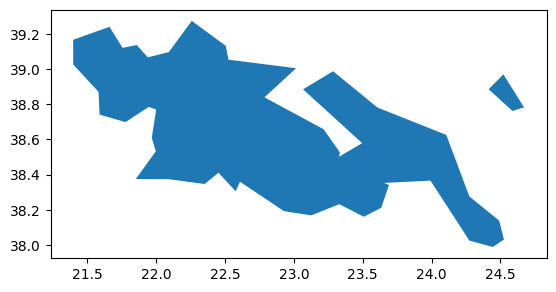
You don’t know which NUTS ID you need? Checkout this interactive map: Exploring NUTS Regions